Appearance
Search drawer
The search drawer opens from the search icon in the header. As the customer types, matching products appear at once, with collections, articles and pages if you turn them on. Before they type, it can show their recent searches, suggested keywords and products.

Live suggestions are turned on in Theme settings → Search. Pressing Enter opens the full search page.
Find it in the editor
The search drawer is in the Overlay group in the sidebar. Click it to open the drawer in the preview while you edit it.

Section settings
General

| Setting | Description |
|---|---|
| Color scheme | The colors of the drawer. Schemes are edited in Theme settings → Colors. |
Suggestions

What appears while the customer types.
| Setting | Description |
|---|---|
| Results per group | How many products, collections, articles or pages each group shows (3–10). Shopify returns at most 10. |
| Search term suggestions | Shows Shopify's own completions for what the customer is typing, so they can pick a full search. |
| Collections | Includes matching collections. |
| Blog articles | Includes matching blog articles. |
| Pages | Includes matching pages, such as your FAQ or shipping page. |
Before the customer types
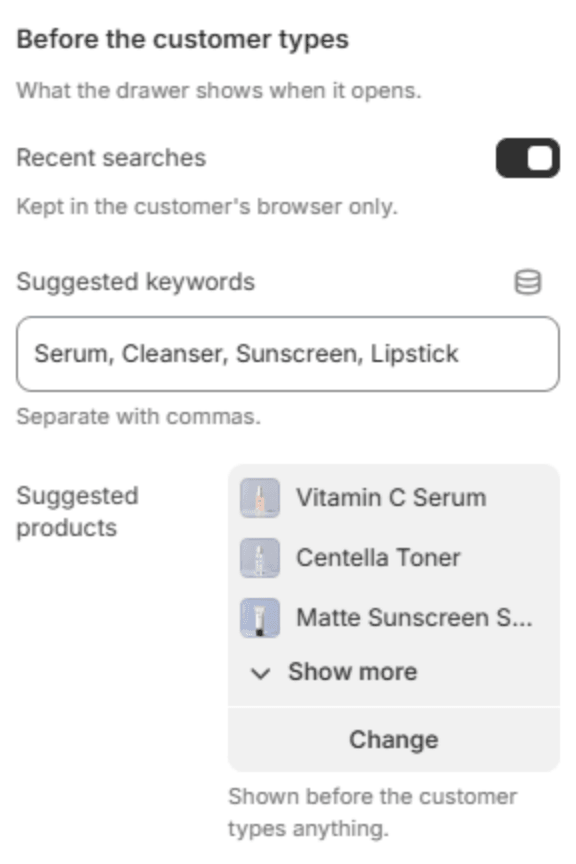
What fills the drawer before anything is typed.
| Setting | Description |
|---|---|
| Recent searches | Shows the customer's own recent searches. They are kept in the customer's browser only. |
| Suggested keywords | Searches to suggest, separated by commas, for example serum, sunscreen, lipstick. |
| Suggested products | Products to show before the customer types anything. |